The Hidden Gatekeeper: How Your Resume Really Gets Read
Every year, millions of job seekers send resumes into what feels like a black hole. They’re qualified. They’ve tailored their applications. They never hear back. The culprit? A piece of software that decided their fate in milliseconds.
Applicant Tracking Systems process millions of resumes every year in the US alone. Understanding how they work isn’t just helpful—it’s essential for anyone serious about landing interviews.
Part 1: The Anatomy of an ATS
What’s Actually Happening Behind the Scenes
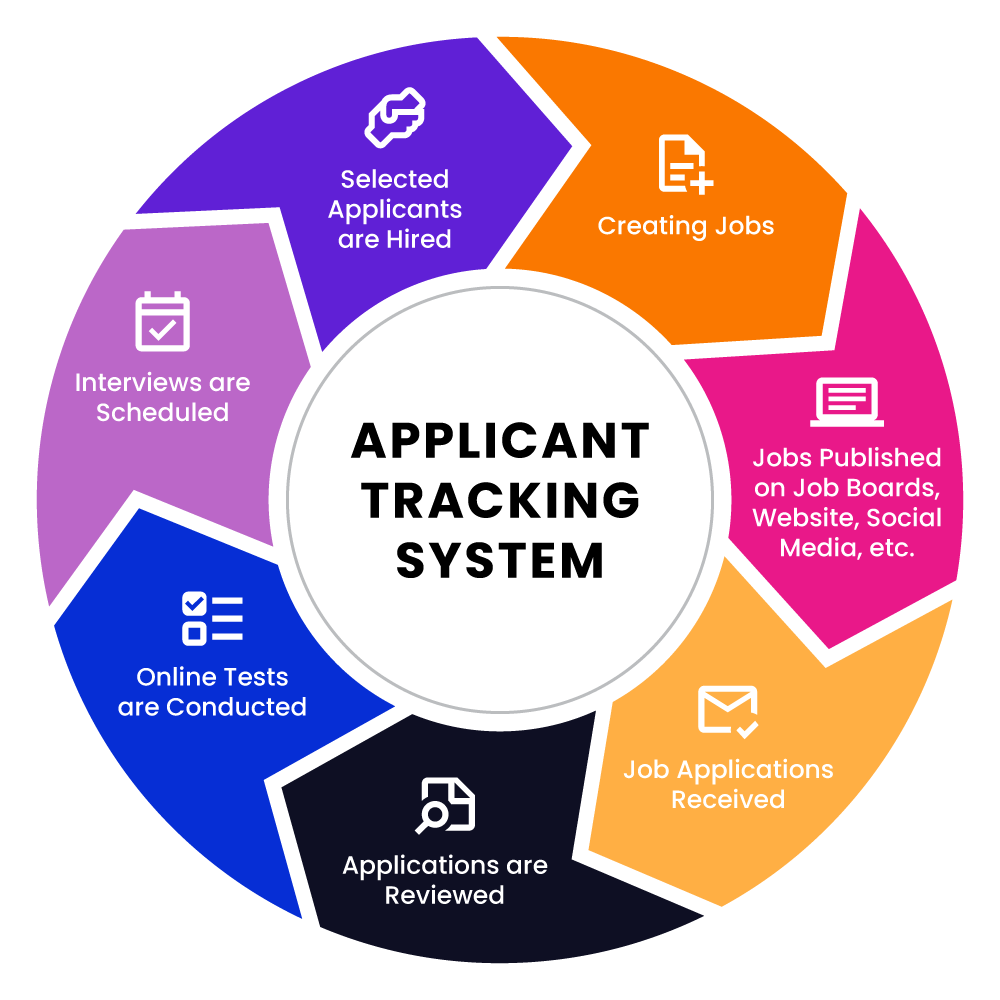
When you click “Submit Application,” your resume doesn’t land on a recruiter’s desk. It enters a digital processing pipeline:
Stage 1: Document Ingestion The ATS converts your file into machine-readable text. This is where formatting disasters happen. That beautifully designed resume with columns, icons, and creative layouts? The system might see:
John Smith | Marketing Manager | (555) 123-4567
…becomes…
John Smith | Marketing Manager | (555) 123-4567Marketing Manager | (555) 123-4567
Tables collapse. Text boxes disappear. Carefully aligned content becomes word soup.
Stage 2: Field Extraction The software attempts to categorize your information into database fields:
- Contact information
- Work history (company, title, dates, descriptions)
- Education (institution, degree, graduation date)
- Skills (parsed into individual keywords)
This is pattern recognition, not intelligence. If your section is labeled “Professional Journey” instead of “Experience,” older systems may not recognize it as work history at all.
Stage 3: Keyword Analysis Here’s where most resumes die. The ATS compares your content against the job posting’s requirements, looking for:
- Hard matches (exact terms)
- Soft matches (synonyms, related terms)
- Weighted priorities (required vs. preferred qualifications)
A job posting asking for “cross-functional collaboration” won’t necessarily match with “worked across departments”—even though they mean the same thing.
Stage 4: Scoring and Ranking Based on keyword density, match percentage, and sometimes recency of experience, you receive a score. Recruiters typically see candidates sorted by this score, and many only review the top 10-20%.
Part 2: The Major Players and How They Differ
Not all ATS platforms are created equal, and knowing which one you’re up against can inform your strategy.
Workday
Used by: Large enterprises, Fortune 500 companies Parsing quality: Moderate Quirks: Heavily structured. Prefers information entered directly into forms rather than parsed from uploads. Your uploaded resume often becomes a backup reference while the form data drives matching.
Greenhouse
Used by: Tech companies, startups, mid-market Parsing quality: Good Quirks: More modern parsing engine. Handles varied formats better but still struggles with complex layouts. Integrates AI-assisted screening increasingly.
Taleo (Oracle)
Used by: Government, large corporations, healthcare Parsing quality: Variable (legacy system) Quirks: Historically known for inconsistent parsing, though recent Oracle updates have improved this. Often requires manual data entry after upload. The uploaded resume may not be what gets searched—the parsed/entered data is.
Lever
Used by: Tech startups, growth-stage companies Parsing quality: Good Quirks: More candidate-friendly interface. Better at handling modern resume formats. Often paired with human review earlier in process.
iCIMS
Used by: Large enterprises across industries Parsing quality: Moderate to Good Quirks: Highly configurable, so parsing behavior varies by employer setup. Some clients enable aggressive filtering; others use minimal automation.
The takeaway: When possible, research which ATS a company uses (often visible in the application URL or job posting metadata). Adjust your formatting expectations accordingly.
Part 3: The Keyword Game—And How to Win It
We cover this in depth in Keywords That Matter: ATS Optimization.
Beyond Simple Matching
Modern ATS platforms have evolved beyond crude keyword counting. They now evaluate:
Contextual relevance: “Python” appearing in a skills section carries more weight than “Python” in a hobby about visiting zoos.
Recency weighting: Skills mentioned in your most recent role often score higher than those from five years ago.
Density thresholds: Keyword stuffing (repeating terms excessively) can actually trigger spam filters in sophisticated systems.
Semantic relationships: Advanced systems recognize that “machine learning” relates to “AI,” “neural networks,” and “predictive modeling.”
The Strategic Approach to Keywords
Step 1: Deconstruct the Job Posting
Take this example posting for a Marketing Manager:
We’re seeking a data-driven marketing professional with experience in demand generation, marketing automation (Marketo or HubSpot preferred), and cross-functional collaboration. The ideal candidate has managed multi-channel campaigns, understands attribution modeling, and can translate complex data into actionable insights for stakeholders.
Extract the hierarchy:
- Must-haves: demand generation, marketing automation, multi-channel campaigns
- Preferred tools: Marketo, HubSpot
- Soft requirements: data-driven, cross-functional collaboration, attribution modeling
- Implied skills: stakeholder communication, data analysis, campaign management
Step 2: Map Your Experience
For each requirement, identify where in your background you’ve demonstrated it. Not everything needs to be a perfect match—adjacent experience counts if you frame it correctly.
Step 3: Natural Integration
Bad keyword optimization:
Managed demand generation and marketing automation using Marketo for demand generation campaigns requiring cross-functional collaboration.
Good keyword optimization:
Led demand generation strategy that increased qualified pipeline by 140% through integrated Marketo automation workflows. Partnered cross-functionally with Sales and Product teams to align campaign messaging with buyer journey stages.
The second version hits the same keywords while demonstrating actual impact and context.
Want to automate this? Resumes Coach analyzes your resume against any job description and shows exactly which keywords you’re missing — and where to add them.
Part 4: Formatting for Survival
The Universal Safe Format
For a detailed formatting checklist, see our ATS-friendly formatting guide.
After testing hundreds of resumes across multiple ATS platforms, here’s what consistently parses correctly:
Document setup:
- Single column layout
- Standard fonts (Arial, Calibri, Georgia, Times New Roman)
- 10.5-12pt body text, 14-16pt headers
- 0.5-1 inch margins
- No headers/footers (contact info in main body)
Section structure:
CONTACT INFORMATION (top of page, not in header)
PROFESSIONAL SUMMARY (2-4 lines, optional but valuable)
EXPERIENCE Company Name | Location Job Title | Start Date - End Date
- Achievement-focused bullet points
EDUCATION Degree, Major | Institution | Graduation Year
SKILLS Comma-separated list or simple categories
File format:
- .docx and PDF both work well with modern systems; .docx has a slight edge with older ATS
- Never use .pages, .odt, or image-based PDFs
Elements That Break Parsing
| Element | Risk Level | Why It Fails |
|---|---|---|
| Tables | High | Columns merge unpredictably |
| Text boxes | Critical | Often completely invisible to parsers |
| Graphics/icons | Critical | Ignored entirely, may corrupt nearby text |
| Multiple columns | High | Reading order becomes scrambled |
| Headers/footers | Moderate | Many systems skip these entirely |
| Unusual fonts | Moderate | May not render or cause character substitution |
| Hyperlinks | Low | Usually work but sometimes strip anchor text |
For the most common formatting pitfalls, see Common ATS Mistakes to Avoid.
Part 5: The Human Element
What Happens After You Pass the ATS
Surviving the algorithm is just qualifying for the tournament—you still need to win matches.
When a recruiter opens your resume, they spend an average of 6-7 seconds on initial scan. They’re looking for:
- Relevant current/recent role - Does your trajectory make sense for this position?
- Recognizable companies or achievements - Quick credibility signals
- Clear progression - Growth in responsibility over time
- Red flags - Gaps, demotions, job-hopping
Your resume needs to serve two masters: machines that scan for keywords and humans that scan for stories.
Balancing Act: ATS vs. Human Readers
For the ATS:
- Include exact terminology from job postings
- Ensure skills are explicitly stated, not just implied
- Use standard section headers
- Maintain consistent date formatting
For humans:
- Lead with impact, not responsibilities
- Quantify achievements whenever possible
- Tell a coherent career narrative
- Make the most important information visually prominent
For more on this balance, read ATS vs Human Readers: Balancing Both.
The sweet spot: A clean, well-structured document that hits keyword requirements while presenting compelling, specific achievements that make a recruiter want to learn more.
Part 6: Testing and Iteration
Before You Apply
Parse testing: Several free tools simulate ATS parsing. Upload your resume and review:
- Did all sections get recognized correctly?
- Are your dates parsing properly?
- Is your contact information intact?
- Do your job titles and companies align correctly?
Keyword analysis: Compare your resume against the job posting:
- What percentage of key terms appear in your document?
- Are you missing obvious requirements?
- Have you included both acronyms AND spelled-out versions? (e.g., “Search Engine Optimization (SEO)”)
A Note on Match Percentage
How closely should your resume match the job posting? There’s no universal threshold, but here’s practical guidance:
If you meet 60-70% of the hard requirements, it’s usually worth applying — especially if your adjacent experience is strong. Research consistently shows that many qualified candidates, particularly women and candidates from underrepresented backgrounds, self-select out of roles they could realistically land. Don’t let a missing checkbox stop you from applying to a role where your core skills align.
That said, if you’re missing most of the key requirements, your time is better spent on stronger-fit roles. Focus your energy where alignment is real, not aspirational.
The Bottom Line
ATS systems aren’t going away. They’re becoming more sophisticated, incorporating AI and machine learning to make increasingly nuanced judgments about candidate fit.
But they’re still tools, not decision-makers. They filter—they don’t hire.
Your job is to clear the filter cleanly so humans can see what makes you valuable. That means:
- Formatting for reliability over aesthetics
- Mirroring language from job postings without sacrificing authenticity
- Structuring information in predictable, parseable patterns
- Demonstrating impact that resonates with human readers
Master these fundamentals, and you’ll consistently reach the interviews your qualifications deserve.
The best resume isn’t the one that games an algorithm—it’s the one that clearly communicates your value while removing every obstacle between you and a hiring conversation.
See how your resume performs. Upload your resume to Resumes Coach and get an instant ATS compatibility score with specific recommendations for improvement.